This post contains affiliate links. If you buy through one, we may earn a commission at no extra cost to you. It never changes what we recommend.
The device that helps is the one that is worn, charged and pressed. Everything else is a detail.
Most falls happen at home, and most happen when the person is alone. So the job of a medical alert device is narrow: shorten the time between a fall and somebody knowing about it.
This guide sorts the options by the questions that actually decide the purchase. Who answers the call? Does it work outside the house? Can it stay on in the shower? And what does it cost to keep running?
- Monitored devices reach a trained operator at any hour, for a monthly fee.
- Family-alert devices call relatives instead, and still need a service plan.
- Landline units can run with no monthly fee, but only inside the home.
- Fall detection is a backup to the button, not a replacement for it.
How to choose medical alert devices for seniors
Medical alert devices for seniors split into three groups, and the first decision is which group fits the household. A monitored device sends the call to a 24/7 response center. A family-alert device calls a list of relatives. A landline system works only at home but can run without a monthly bill.
The stakes are real. The CDC reports that more than one in four older adults falls each year. Falls also send about 4.5 million older people to emergency departments annually. So the question is not whether to plan for a fall, but how help will arrive once one happens.
Five devices, five kinds of household


Who answers the call
This is the decision that shapes everything else, because it decides the monthly cost and the response at 3 a.m.
Monitored devices route the button to a response center that is staffed around the clock. The operator talks through the device's speaker, decides what help is needed, then calls EMS or family. If the wearer cannot speak, they send help anyway. NCOA's reviewers treat a response under 60 seconds as good, which is a useful bar when you compare services.
Family-alert devices skip the response center and call relatives instead. That suits a household where someone is always close enough to drive over. But it only works if a relative actually picks up, so check how the device behaves when nobody answers.
Landline systems dial out over a home phone line. They can run without a monitoring bill, yet they stop working at the front door.
If you are comparing loud carry alarms rather than devices that call for help, read the personal alarms for the elderly guide instead. Those make noise; these make a phone call.
Every monitored and family-alert device in this guide needs an ongoing service plan to work. The plan covers the cellular connection and, for monitored devices, the 24/7 operators. Fall detection is usually a separate paid add-on. Compare the plan cost over two years, not the price of the hardware.
What fall detection can and cannot do
Fall detection uses motion sensors to guess when the wearer has hit the floor, then starts a call without a button press. It is worth having for someone who lives alone. But it is a guess, so treat it as a second line of defense.
The research is thinner than the marketing suggests. A systematic review of fall detection devices found that only about 7% of wearable projects had been tested with older adults in real homes. Lively says plainly that its sensor does not detect every fall, and it only works when the device is worn on the included lanyard.
The bigger problem is behavioral. In a BMJ study of people over 90, 80% of those who fell could not get up without help at least once. Nearly a third lay on the floor for an hour or more. Most had call alarms, yet few used them in those long-lie falls. So the best device is the one the wearer is willing to press, every time.


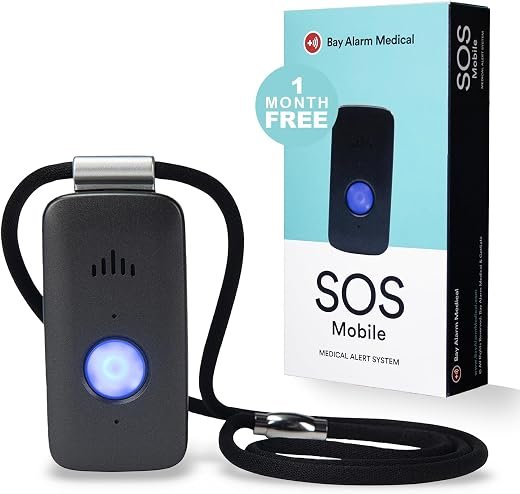
Bay Alarm Medical SOS Mobile: the one that stays charged
01
Monitored 4G button for home and away
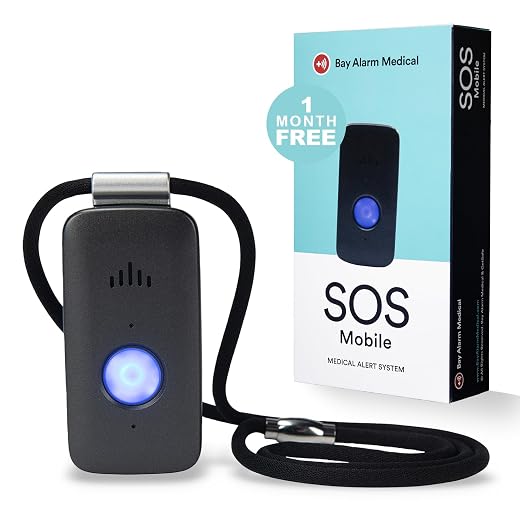
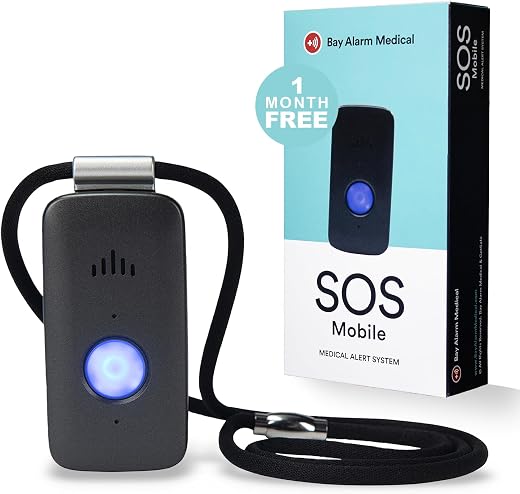
The SOS Mobile is a one-button 4G device that connects to Bay Alarm’s monitoring center through a two-way speaker. Bay Alarm’s user guide rates the battery at up to six days and a full charge at about three hours. That matters more than any feature, because a device on the nightstand protects nobody.
It weighs under 2 oz and is rated IP67. However, the guide says not to submerge it, so ask the provider before relying on it in the shower. Caregivers get a free tracking app with location and low-battery alerts. The guide also warns that location may not always be precise.
- Longest battery life in this group, up to six days
- Works at home and away on 4G LTE
- Free caregiver app with location and battery alerts
- Optional fall detection model
- Monitoring plan required to work at all
- Guide says do not submerge it
- Location accuracy can be limited indoors
Lively Mobile2: built to stay on in the bathroom
IPX7 mobile alert with a caregiver app
The Mobile2 carries an IPX7 rating, and Lively markets it for the shower, the pool and the rain. Bathrooms are a common place to fall, so a device that never comes off is a genuine advantage.
The trade is battery life. Lively quotes up to three days per charge, about half of the Bay Alarm unit. A Lively plan is required, and fall detection is an extra monthly add-on that only works on the included lanyard. Lively also states that the device cannot be used with other carriers.
- IPX7 rating suits daily shower wear
- GPS location with the call
- Caregiver app sends family notifications
- Up to three days per charge
- Fall detection costs extra and needs the lanyard
- Locked to Lively’s own service
SecuLife SOS Pendant: family on speed dial
Alerts relatives instead of a call center
SecuLife sends alerts to people you choose rather than to a response center. When the button is pressed or a fall is detected, it texts your contacts with a live location. Then it calls each contact in turn until someone answers.
Be clear about the cost model. The pendant cannot connect without a SecuLife service plan, so this is not a no-fee device. It suits families who would rather answer the call themselves than pay for operators.
- Familiar voices answer, not strangers
- Automatic fall detection included
- GPS geofences alert family when the wearer leaves a zone
- Service plan required despite no call center
- Nobody is guaranteed to answer at night
- Relies on relatives deciding what to do
LogicMark Freedom Alert: one purchase, no bill
Two-way voice pendant over a home landline
Freedom Alert is the only pick here with no monthly fee. The pendant talks to a base station, which dials your programmed contacts over a regular phone line. If nobody answers, it can default to a 911 operator.
The pendant is water-resistant for bath and shower use, and the base keeps working for up to 24 hours on backup batteries. However, it needs a working landline and does nothing outside the house. If your phone service is digital, confirm compatibility with LogicMark before you buy.
- No ongoing monitoring cost
- Can fall back to 911
- Base has battery backup for outages
- Requires a landline
- No protection away from home
- No fall detection
CallToU Caregiver Pager: the simplest fix
Two call buttons and two plug-in receivers
Strictly speaking this is a call bell, not a medical alert system. It reaches a partner or carer who is in the house but not within earshot. The kit pairs two buttons with two receivers, and the listing quotes 500+ ft in open areas.
The buttons are waterproof and can hang on a neck strap, so one can live in the bathroom. However, nothing happens if the carer is out, so it suits a shared home rather than someone living alone.
- No plan, no activation, no monthly cost
- Waterproof buttons for the bathroom
- Receivers can move from room to room
- Only reaches someone inside the home
- Receivers need a wall outlet
- No voice, location or fall detection
Comparing medical alert devices for seniors side by side
The table lines up the features that change the decision. Battery life and water resistance come from the makers' own guides and listings, so treat them as claims.
Bay Alarm SOS Mobile | Lively Mobile2 | SecuLife Pendant | Freedom Alert | CallToU Pager | |
|---|---|---|---|---|---|
|
|
|
|
|
| |
| Who answers | 24/7 operators | 24/7 agents | Your contacts | Your contacts, then 911 | A carer at home |
| Works away from home | Yes | Yes | Yes | No | No |
| Fall detection | Optional model | Paid add-on | Included | No | No |
| Water resistance | IP67, do not submerge | IPX7 | Water resistant | Bath and shower safe | Waterproof button |
| Service plan | Required | Required | Required | None | None |
| Battery | Up to 6 days | Up to 3 days | Up to 6 days | Rechargeable pendant | Plug-in receiver |
| Check price | Check price | Check price | Check price | Check price |
Five checks before you buy
- Match the device to where falls happen
Bathrooms and stairs are common fall sites, so the device has to stay on there.
Look forAn IP rating and a maker statement that it is shower safe.AvoidDevices the wearer must take off to bathe. - Count the charging routine
A device that needs nightly charging is often found on the nightstand after a fall.
Look forMulti-day battery life and a clear low-battery warning.AvoidAssuming a forgetful wearer will charge daily. - Decide who should answer
Operators answer at any hour. Relatives answer when they can.
Look forA routing method that matches who is actually available overnight.AvoidFamily-alert devices for someone whose relatives live far away. - Price the plan over two years
The hardware is the small part of the cost on most monitored devices.
Look forThe monthly plan plus any fall detection add-on.AvoidComparing devices on the hardware price alone. - Test the button with the wearer
The button must be easy to find and press without glasses, often from the floor.
Look forOne large raised button the wearer can press with stiff fingers.AvoidSmall or recessed buttons.
Frequently asked questions
Do medical alert devices for seniors work without a monthly fee?
Some do. Landline systems like Freedom Alert can run with no monitoring bill, and caregiver pagers need no service at all. Cellular devices, including family-alert pendants, need a service plan to connect.
Is fall detection reliable enough to rely on?
No device catches every fall, and makers such as Lively say so. Real-world testing with older adults is limited. Treat automatic detection as a backup and practice pressing the button.
Can a medical alert device be worn in the shower?
Check the rating and the manual. Lively rates the Mobile2 at IPX7 for shower use. Bay Alarm rates the SOS Mobile at IP67 but advises against submerging it.
What happens if the wearer cannot speak after pressing the button?
Monitored services generally send help to the wearer’s location when nobody responds. Family-alert devices depend on the relative who answers deciding what to do.
Do these work in assisted living or a care home?
Ask the facility first. Many run their own call systems and prefer residents not to add a separate device.
Start with the Bay Alarm SOS Mobile if the wearer lives alone or still goes out, because its long battery life keeps it ready. Choose the Lively Mobile2 if it must stay on in the shower. Pick Freedom Alert only for a homebound senior with a landline, and the CallToU pager when a carer is already in the house.
Choose by who answers, then by what gets worn
- Monitored devices answer at any hour, for a monthly plan.
- Family-alert pendants still need a service plan.
- Fall detection is a backup, not a guarantee.
Medical alert devices for seniors only work when they are worn, charged and pressed. Decide first whether operators or family should answer. Then pick the device the wearer will actually keep on in the bathroom.
SecuLife Medical Alert Pendant for Seniors — Alerts Go Direct to Family, No Call Center | Auto Fall Detection, GPS Tracking, 2-Way Calling, No Contract,...
Features
| Brand | Seculife |
| Special Feature | 2-Way Calling, Fall Alerts, GPS Tracking, Geo-Fence, SOS |
| Connectivity Technology | 4G LTE Cellular |
| Supported Application | Health Monitoring, Location Tracking, Voice Calling |
| Specific Uses For Product | Elderly Care, Emergency Alert System, Seniors |
- ❤️ 𝐌𝐞𝐝𝐢𝐜𝐚𝐥 𝐀𝐥𝐞𝐫𝐭 𝐏𝐞𝐧𝐝𝐚𝐧𝐭 𝐰𝐢𝐭𝐡 𝐅𝐚𝐥𝐥 𝐃𝐞𝐭𝐞𝐜𝐭𝐢𝐨𝐧: Designed for seniors and individuals with medical conditions, this wearable alert device automatically detects falls and immediately call and send SOS notification to preselected emergency contacts.
- ✅ 𝐄𝐚𝐬𝐲 𝐀𝐜𝐭𝐢𝐯𝐚𝐭𝐢𝐨𝐧 | 𝐌𝐨𝐧𝐭𝐡𝐥𝐲 𝐬𝐮𝐛𝐬𝐜𝐫𝐢𝐩𝐭𝐢𝐨𝐧 𝐫𝐞𝐪𝐮𝐢𝐫𝐞𝐝: $20 per month. Unlimited Fall Alerts, Unlimited Live Tracking, Assistive Speakerphone with Unlimited Voice Mins every month, Intelligent Alerts, Premium Safety Features, Unlimited Live 7 Days a week Customer Care, & more.
- 📞 𝐒𝐎𝐒 𝐁𝐮𝐭𝐭𝐨𝐧 𝐰𝐢𝐭𝐡 𝟐-𝐖𝐚𝐲 𝐂𝐚𝐥𝐥𝐢𝐧𝐠: One-touch emergency communication makes a cellular call just like a cellphone. Also receives calls easily with hands-free auto-answer feature for convenience and reliability. This personal emergency alert device allows direct, hands-free voice calls with caregivers or emergency contacts.
- 📍 𝐑𝐞𝐚𝐥-𝐓𝐢𝐦𝐞 𝐆𝐏𝐒 𝐓𝐫𝐚𝐜𝐤𝐢𝐧𝐠 & 𝐆𝐞𝐨𝐟𝐞𝐧𝐜𝐞 𝐙𝐨𝐧𝐞𝐬: Always know your loved one's location. Set custom safe zones with this medical alert system GPS and receive alerts when they enter or leave designated areas. 1 Year location history available
- 🧓 𝐄𝐚𝐬𝐲-𝐭𝐨-𝐔𝐬𝐞, 𝐒𝐞𝐧𝐢𝐨𝐫-𝐅𝐫𝐢𝐞𝐧𝐝𝐥𝐲 𝐃𝐞𝐬𝐢𝐠𝐧: Built for simplicity, the pendant features a clear display showing time, battery, and signal. Large SOS button and intuitive interface make it ideal for elderly users.
- 🕒 𝐄𝐱𝐭𝐞𝐧𝐝𝐞𝐝 𝐁𝐚𝐭𝐭𝐞𝐫𝐲 𝐋𝐢𝐟𝐞 – 𝐔𝐩 𝐭𝐨 𝟔 𝐃𝐚𝐲𝐬: This medical alert device stays powered longer, reducing charging frequency for fast help, greater convenience and peace of mind. Up to 6 days with 1 hour interval tracking
- 💧 𝐂𝐨𝐦𝐩𝐥𝐞𝐭𝐞𝐥𝐲 𝐦𝐨𝐛𝐢𝐥𝐞 𝐚𝐧𝐝 𝐰𝐚𝐭𝐞𝐫𝐩𝐫𝐨𝐨𝐟: Shower, rain, or accidental splashes? No problem. This emergency medical alert is fully waterproof IP67 and wearable 24/7.
Bay Alarm Medical SOS Mobile GPS - 24/7 Medical Alert with Optional Fall Detection for Seniors - Call to Activate - 4G GPS Medical Alert System with Elderly...
Features
| Brand | Bay Alarm Medical |
| Built-In Media | What’s Included? 1x SOS Mobile GPS Device on Verizon's 4G LTE Network, 1x Charging Dock w/ Power Adapter, 1x Lanyard w/ Magnetic Clasp, 1x Belt Clip, Caregiver Tracking App Access |
| Unit Count | 1 Count |
| Manufacturer | Freeus |
| Number of Items | 1 |
| Item Type Name | Mobile SOS Help Button |
| ASIN | B0C4QTKR83 |
| Additional Features | Rechargeable, GPS Location, Free Caregiver App, Optional Fall Detection |
| Connectivity Technology | Cellular |
| Supported Application | Alarm |
| Specific Uses For Product | Elderly Care, Help/Panic Button, Caregiver Tracking |
| Battery Average Life | 144 hours |
| Compatible Devices | [SOS Mobile GPS Device] |
| Battery Capacity | 420 milliamp_hours |
| Item Dimensions | 2.72 x 1.38 x 0.57 inches |
| Enclosure Material | Plastic |
- Simple Setup: Includes easy-to-follow instructions for quick start.
- Subscription Required: Ongoing service plan needed for full device functionality.
- 4G LTE Coverage: Reliable nationwide cellular connectivity helps keep you connected when it matters most.
- Compact & Lightweight: Weighs under 2 oz and can be worn with a lanyard or belt clip. Designed for durability with water-resistant protection.
- One-Button Access: Quickly connect with a trained operator through the built-in two-way speaker for assistance when needed.
- Caregiver Support: Monitor device status, battery level, and activity through a companion mobile app.
- Long Battery Life: Lasts up to several days on a single charge depending on usage and network conditions.
- Standalone Device: Works independently without requiring a smartphone connection.
- Multiple Wearing Options: Wear around the neck or clip to clothing or accessories for convenience.
Freedom Alert, Landline Personal Emergency Device, 2-Way Call with Family and Police for Home Safety, Device for Seniors and The Elderly
LIVELY Mobile2 Medical Alert Device, Water Resistant, Lanyard Included
Features
| Power Source | Battery Powered |
| Compatible Devices | Smartphone |
| Battery Description | Lithium-Ion |
| Number of Batteries | 1 Lithium Ion batteries required. (included) |
| Control Method | App, Touch |
| Sensor Technology | Sensor Technology |
| Color | Black |
| Item Highlight | 24/7 Emergency Help with Optional Fall Detection, water resistant Design & an Included Lanyard for Greater Independence |
| Brand | Lively |
| UPC | 850028621332 |
| Item Weight | 16 ounces |
| Unit Count | 1 Count |
| Manufacturer | Lively |
| Number of Items | 1 |
| Mfr Part Number | R5-RTL-BLK-8IN |
| ASIN | B0CV83V94H |
- Fast help in emergencies, 24/7: With the fastest call response time, in emergencies big or small, one touch of the Urgent Response button connects the Lively Mobile2 to our certified agents, who will asses the situation and provide help 24/7
- Fall Detection: In the event of a fall, the Lively Mobile2 can automatically connect to our caring team, who can dial in a loved one for help or dispatch emergency services if needed, even if you are unable to press the button; add Fall Detection to your Lively Plan for 9.99/month
- Automatic family notifcations: Easily keep family members notified of an emergency with automated notifications on their smartphone through our exclusive caregiving app
- Completely mobile and water resistant: Since the Lively Mobile2 doesn’t require a landline or base station, have peace of mind knowing it can be taken anywhere, even outside the home; the Lively Mobile2 is water resistant, so it can even be worn in the shower, at the pool or in the rain
- Discreet design: The small, lightweight Lively Mobile2 is easy to wear; clip it to a belt, put it in a purse or wear it around the neck with the included fall detection lanyard
CallToU Caregiver Pager with 2 Wireless Call Button for Elderly at Home
Features
| Power Source | Battery Powered |
| Compatible Devices | Caregiver Pager Receiver |
| Battery Description | Alkaline |
| Number of Batteries | 2 12V batteries required. (included) |
| Voltage | 260 volts |
| Control Method | Touch |
| Audible Noise | 110 db |
| Mounting Type | Tabletop Mount |
| Maximum Range | 500 feet |
| Sensor Technology | Contact Sensor |
| Color | white 2+2 |
| Item Highlight | Easy Use, Loud Whole-Home Alerts, 500+FT Through-Wall, Waterproof Call Bell Alert Buttons for Seniors/Elderly/Patients/Adults |
| Brand | CallToU |
| UPC | 682559357837 606413659356 |
| Number of Packs | 2 |
| Item Weight | 0.2 kg |
| Unit Count | 4 Count |
| Size | 2 call buttons + 2 receivers |
| Manufacturer | CallToU |
| Manufacturer Warranty Description | 1 Year Manufacturer |
| Number of Items | 4 |
| Model Number | CC01 2-2 |
| Mfr Part Number | CC 2-2 |
| ASIN | B077SYPD5K |
- [ Wireless Guard ] 2 Receiver 2 Call Button. Allow caregivers and residents to be free while ensuring that help is still available at the touch of a button, ideal for elderly, seniors, patients, disabled
- [ Easy to Carry ] The receiver can be moved with the caregiver and the open area working range is 500+ ft, you can take it to the bedroom, kitchen or living area(receiver requires plugging into an outlet). The call button can also be hung around the neck of the person with a neck strap who needs help like a pendant or secured with a bracket or double sticker
- [ Smart Ringtones ] The receiver of caregiver pager has 55 ringing tones to choose from and 5 level adjustable volume from 0db to 110db. Easy use by plug the receiver into an electrical outlet
- [ High Quality ] Both call button and receiver are waterproof and dustproof. Whether you install it in the washroom or take it outside on a rainy day, you don't have to worry about this caregiver pager getting wet
- [ Dont Hesite to Order ] The sophisticated packaging helps you keep the pager secure without worrying about losing it. If you have any questions, you can check the included user manual, and 24 hours customer services and professional technology team are standing by