
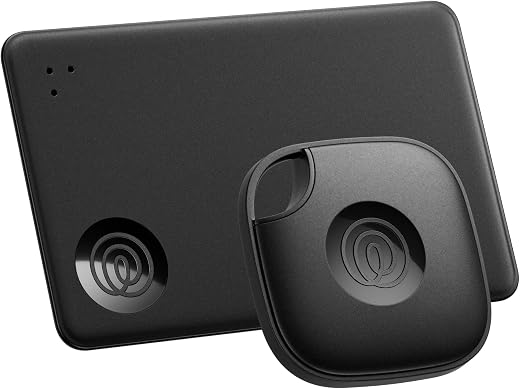
A tracker is only useful after the keys have left Bluetooth range.
The familiar failure happens after the last known connection: keys are gone, the map shows an old pin, and Bluetooth is far too short-ranged to help. At that point, the tag needs a crowd network—nearby phones that detect it and relay an encrypted location—not merely a loud ringer.
For Android owners, compatibility is the first filter. Samsung SmartTag2 can tap Samsung’s Galaxy-based network and adds UWB direction finding on compatible Galaxy hardware, but it is not a general Android solution. Tile Mate and Slim trackers work through the Life360 app across Android phones; their practical reach depends on how many participating phones pass nearby. The more revealing question is where keys vanish: at home, in a car, or in busy public places. Network density matters far more in the last case.
- SmartTag2’s UWB finding requires a compatible Galaxy phone.
- Tile’s Mate is designed for key rings; the Slim is shaped for wallets or flat items.
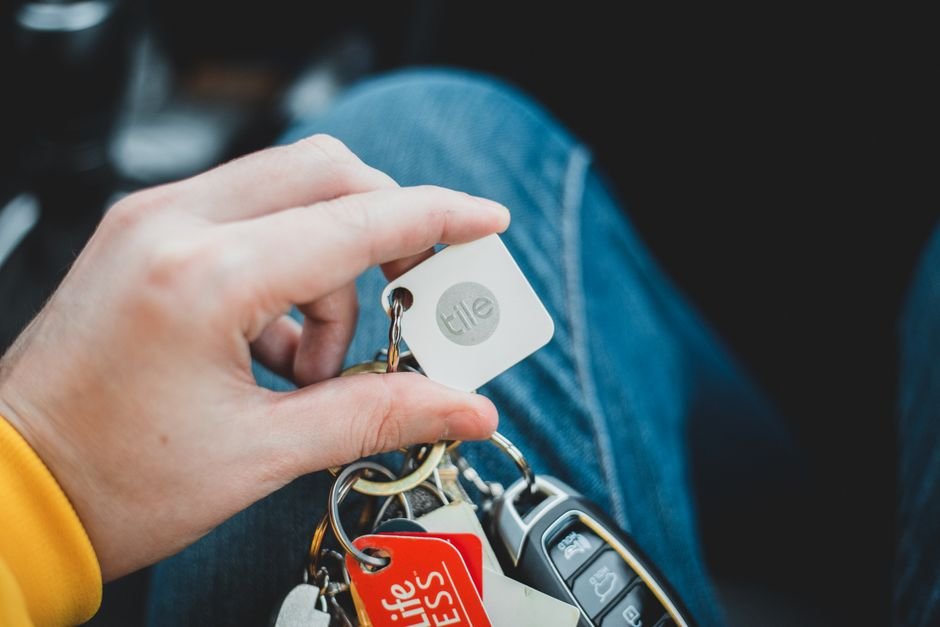
A pair for mixed phones, or a Galaxy-native tag

A tracker can ring nearby through Bluetooth; a distant recovery depends on participating phones passing its location to the relevant network. Coverage can vary sharply by neighborhood, travel route, and platform adoption.
For dependable results, the tag needs the correct app permissions, Bluetooth enabled, and a compatible phone. SmartTag2 is Galaxy-only, while Tile’s cross-platform support can simplify a mixed-phone household—but neither label guarantees a recent location update.
A Ring, a Pin, and an Arrow Are Not the Same Thing
Nearby Bluetooth ringing
When the phone can still connect directly to the tag, it can make the tag play a sound. This is the practical mode for keys under a sofa, in a bag, or in the next room; it does not require passers-by or a location network.
Crowd-assisted location
Once the tag is out of Bluetooth range, nearby participating phones may detect its encrypted Bluetooth signal and relay an approximate map location. The update can be delayed, absent indoors, or stale when few compatible phones pass nearby.
UWB directional finding
Ultra Wideband can add distance and arrow-like guidance during the final search, but only at short range and only with compatible phones. SmartTag2 can offer this on supported Galaxy handsets; Tile Mate and Slim rely on Bluetooth proximity rather than UWB direction.
Network boundaries
A tracker does not broadcast to every Android phone. SmartTag2 reports through Samsung Find and is built for Galaxy devices, while Tile uses its own Tile/Life360 ecosystem rather than Google’s Android Find My Device network. Apple’s Find My network is separate again.
Why the distinction matters
Ringing resolves a nearby misplacement; a crowd location helps reconstruct where an item may have gone; UWB shortens the final few metres. A strong result in one mode does not imply equally strong recovery in the others.
Match the Tracker to Everyday Traffic
- Start with the phones already carried
SmartTag2 is a natural fit where the key holder uses a Galaxy phone; its richer finding features depend on compatible Galaxy hardware. Tile Mate and Slim keep the same keys findable from Android and iPhone households.
Look forA tracker every regular key user can access.AvoidBuying into a phone ecosystem no one uses. - Count the household, not one handset
A Tile pair can make sense when partners or family members use different mobile platforms. A Galaxy-only setup is more coherent when Galaxy phones dominate and shared access stays within that group.
Look forShared finding that matches all regular users.AvoidA tag only one person can manage. - Choose the form that fits the keyring
Mate suits a conventional key ring and offers a physical button; Slim is shaped for a wallet or flat pouch rather than a jangling cluster. SmartTag2 is a ring-style tag, so bulk and attachment point matter.
Look forA shape that stays attached without annoyance.AvoidForcing a card tracker onto keys. - Picture where the keys disappear
Network reach matters most at offices, transit stops, cafés, and other places with passing phones. At a quiet home or remote shed, nearby Bluetooth range and a loud ring are often more useful than a long feature list.
Look forThe network most present at likely loss sites.AvoidJudging recovery by specifications alone.
A keyring tracker and a wallet card in one pack
Best for Android users tracking keys and wallets
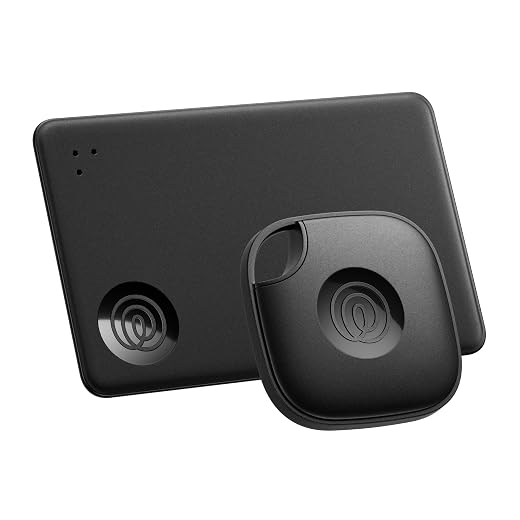
Life360’s Tile Mate and Tile Slim pair addresses the two losses that happen differently: keys tend to vanish nearby, while a wallet benefits from a thin, card-shaped tracker. Both work through the Tile/Life360 app on Android and iPhone, making the pair a practical fit for households that do not use one phone platform.
For a missing item beyond Bluetooth range, the app can show a newer location only when a nearby participating device detects the Tile. That is useful in busy places, but not a substitute for a guaranteed live location service.
- One pack covers keys and a wallet
- Shared support for Android and iPhone households
- App can ring a nearby tracker
- Phone finder works from the Tile button
- Out-of-range updates depend on nearby participating devices
- No UWB-style directional finding is indicated
- Slim format is limited to items with a suitable pocket
This is a convincing starting pair when keys and a wallet need different shapes and family members use different phones. Nearby finding is straightforward; distant recovery is conditional. A fresh out-of-range location depends on passing Tile network participants, so results will vary sharply between a crowded transit stop and a quiet trail.
Samsung SmartTag2 for a Galaxy-centered routine
Top choice for Galaxy devices needing rugged tracking
SmartTag2 is a keyring tracker built around SmartThings Find, rather than a general Android tracker. It makes the most sense where a Galaxy phone already manages devices, automations, and item finding, so locating a bag or keys stays inside one familiar Samsung app.
- Native SmartThings Find integration
- UWB can provide directional nearby guidance
- IP67-rated body suits exposed keyrings
- Long claimed battery life
- Not compatible with non-Galaxy Android phones
- Precision guidance needs a UWB-equipped Galaxy phone
- Distant recovery depends on nearby participating Galaxy devices
- SmartThings-centric setup is limiting in mixed-phone households
For an established Galaxy owner, SmartTag2 offers a notably integrated route from a last-known network location to a close-range search in SmartThings Find. Compatibility is the decisive caveat: it is Galaxy-only, and the precise directional experience requires a compatible UWB Galaxy phone. On other Android brands, it is not merely less capable—it cannot serve as the tracker at all.
| Mixed-phone pair Life360 Tile Mate and Slim Tracker Two-Pack | VS | Galaxy-focused tag Samsung SmartTag2 Bluetooth and UWB Tracker |
|---|---|---|
Android + iPhone | Phone access |
Galaxy only |
Keyring + wallet card | Included shape |
Keyring tag |
Nearby Tile app devices | Out-of-range recovery |
Nearby Galaxy devices |
Ring; Bluetooth proximity | Final approach |
UWB direction on supported Galaxy |
Phone finder; optional SOS | Safety behavior |
Unknown-tag alerts apply |
| Check | Check |
The deciding question is not the Bluetooth range printed on a box. Once an item is beyond direct Bluetooth reach, a location can refresh only when a compatible network phone passes nearby and contributes an encrypted sighting.
The Tile pack covers a keyring item and a card-shaped wallet tracker while remaining accessible from Android and iPhone. That flexibility matters in mixed-phone homes, but its recovery coverage follows local Tile-network traffic rather than Android itself.
SmartTag2 can offer an on-screen directional approach only with a compatible UWB-equipped Galaxy phone; it does not improve a tag’s chance of being detected miles away. Its Galaxy-only SmartThings Find network can be compelling where Galaxy phones are common, but restrictive everywhere else.
A ring is for a misplaced item nearby, not distant recovery. Before buying, confirm the exact phone and regional support, battery replacement procedure, form-factor fit, and unwanted-tracker alerts; those anti-stalking protections may also notify a person carrying an unknown tag.
Network density at the places keys are commonly lost is usually more consequential than claimed radio distance.
Set the tracker up to report when it matters
-
Enroll it on the intended phone
Sign in to the Tile or Samsung account first, then add the tracker while Bluetooth is on. Confirm that it appears in Tile or SmartThings Find—not merely in the phone’s Bluetooth device list.
-
Grant the location-related access
Allow Nearby devices/Bluetooth, Location, notifications, and background access where Android presents those controls. Samsung’s network features also require SmartThings Find participation.
-
Name it for the moment of loss
Use a specific label such as “black car keys” rather than “Tracker.” It makes alerts, shared households, and a crowded tracker list easier to interpret.
-
Check power-saving exclusions
Battery Saver, restricted battery mode, disabled background data, or revoked “unused app” permissions can stop location refreshes and separation alerts. Verify the app is allowed to run in the background.
-
Run two practical tests
Ring the tag from another room, then leave it behind briefly and inspect the last-seen location after returning. Review the tracker’s battery replacement steps before relying on it for travel.
A successful pairing test does not prove distant network coverage; that depends on nearby participating phones.
Android may preserve battery by limiting an app that has not been opened recently. When background access or notifications are disabled, the tracker can still connect at close range yet fail to deliver the expected network update or left-behind alert. Recheck these settings after a system update, phone transfer, or aggressive battery-cleaning app.
When a safety alert appears
Unknown-tracker alerts and cross-platform safety
Unknown-tracker alerts flag a tag that appears to move with someone who doesn’t own it. On Android, alerts can appear if a family keyring or shared car carries a Tile nearby.
A legitimate owner can reduce confusion by naming shared items in the app and noting that a tracker is attached. That does not make covert tracking acceptable; a tag hidden on someone or in their belongings without their knowledge is a safety concern.
Additionally, Alert timing, scan behavior, and device support can change as Android, SmartThings, Tile, and cross-platform detection standards receive updates. Current in-app guidance is the reliable reference.
If an unfamiliar tracker is reported nearby, the alert may offer steps to make it sound, identify it, or disable it. Shared-item explanations can be checked, but they should not be assumed.
Buy for the Phones and Places That Matter
- A keyring hole, wallet-card shape, or adhesive format can matter as much as range.
- A UWB arrow helps only when the phone and tracker share that capability.
Start with the phones already in the household. Tile Mate and Slim make sense where Android and iPhone users may both need access; SmartTag2 is a more natural fit where Galaxy phones dominate and compatible handsets can use its directional finding.
Then select the shape that belongs on the item, and judge the recovery network by the places keys actually disappear: a busy station, workplace, apartment block, or quiet trail can produce very different results. A tracker’s distant location is only as current as the participating phones that pass nearby.
Life360 Tile Mate – Everything You Need to Know!
Samsung Galaxy SmartTag 2 Tips and Tricks
Life360 Tile Starter Pack - Bluetooth Trackers and Item Finders for Keys, Wallets & More. Both iOS and Android Compatible. Phone Finder. 2-Pack (Black...
Features
| Brand | Life360 |
| Number of Batteries | 1 Lithium Metal batteries required. (included) |
| Antenna Location | Keys, Wallets, Bags, Phone |
| Unit Count | 2 Count |
| UPC | 819039025287 |
| Number of Items | 2 |
| Number of Packs | 2 |
| Global Trade Identification Number | 00819039025287 |
| Manufacturer | Life360 |
| Built-In Media | 1 x Tile Mate, Black, 1 x Tile Slim, Black |
| Model Number | T1801,T2101N |
| Mfr Part Number | RE-65012 |
| Warranty Description | 1-Year Limited |
| ASIN | B0D636M1RN |
| Compatible Devices | Smartphone, Tablet |
| Battery Average Life | 3 years |
| Connectivity Technology | Bluetooth |
| Control Method | App |
| Range | 350 feet |
| Item Dimensions L x W x Thickness | 1.49"L x 1.49"W x 0.28"Th |
| Item Weight | 8.9 g |
| Enclosure Material | Plastic |
| EU Spare Part Availability Duration | 3 years |
- OUR FAVORITE PAIRING: Use the Tile Mate and Slim for your keys, wallet, bags, and more. Protect lost or stolen stuff and make family life easier
- FIND YOUR THINGS: Ring your misplaced Tile, or track it down in the free app
- FIND YOUR PHONE: Phone hiding under a cushion? Use your Tile to make it ring — even when silenced
- STAY SAFE WITH SOS: Discreetly trigger an SOS alert to your loved ones in unsafe situations
- USE WITH LIFE360: Add your Tiles to Life360 — a top family connection and safety app – to see everything and everyone on the same map
Samsung SmartTag2 (2023) Bluetooth + UWB, IP67 Water and Dust Resistant, Findable via App, 1.5 Year Battery Life - Black (International Version)
Features
| Brand | Samsung |
| Number of Batteries | 1 Lithium Metal batteries required. |
| Unit Count | 1 Count |
| Number of Items | 1 |
| Manufacturer | Samsung |
| Built-In Media | Samsung SmartTag2 (2023) Bluetooth + UWB, IP67 Water and Dust Resistant, Findable via App, 1.5 Year Battery Life - Black (International Version) |
| Item Type Name | Samsung SmartTag2 (2023) Bluetooth + UWB, IP67 Water and Dust Resistant, Findable via App, 1.5 Year Battery Life - Black (International Version) |
| Model Number | EI-T5600BBEGWW |
| Mfr Part Number | EI-T5600BBEGWW |
| Warranty Description | Warranty |
| ASIN | B0CHN2D8KM |
| Compatible Devices | Smartphone, Tablet |
| Battery Average Life | 1.5 years |
| Connectivity Technology | Bluetooth |
| Control Method | App |
| Range | 10 meters |
| Item Dimensions L x W x Thickness | 0.31"L x 1.13"W x 2.06"Th |
| Item Weight | 0.5 g |
| Enclosure Material | Plastic |
- Find your things with ease: The SmartThings Find app uses Bluetooth and ultra-wideband (UWB) technology to locate and keep track of your stuff
- Water and Dust Resistant: IP67 rating offers protection against dust and water immersion between 15 cm and 1 meter for up to 30 minutes
- Compatible with Galaxy Devices Only.


13 Comments
This is the first comparison I’ve read that separates “finding it in the couch” from “getting a location after I leave it somewhere.” That distinction matters a lot. I have Android phones in the house but no Galaxy phones, so the Tile pair seems like the less fancy but more practical choice for us.
I wish manufacturers made more tracker shapes for awkward items. A key ring and wallet card cover the obvious stuff, but what about a glasses case or a bike pouch? Still, matching the tracker to the phones in the house before obsessing over specs is solid advice.
The reminder to test it away from home is excellent. My old tracker rang perfectly in my apartment, which made me think it was great—then I left my keys at a quiet trailhead and the “network” turned into wishful thinking. No tracker can ping phones that aren’t there.
I’m a Galaxy S23 owner and was tempted by SmartTag2 mainly for the arrow guidance. Does the UWB direction feature still work if the tag has not been seen by another Galaxy phone recently, or is that only for the final close-range search?
I lose my keys inside my own house far more often than at a store, so that part may actually be worth more to me than the wider network.
For the situation you describe, the directional feature is primarily the close-range, final-approach tool. A recent network sighting helps establish a remote or last-known area when the item is away, but once you are near the tag, Bluetooth/UWB finding is a separate job. With an S23, SmartTag2 is a sensible fit if your exact model supports the relevant UWB finding feature and your keys mostly go missing nearby.
Yep, the arrow is for the “which pile of laundry?” phase, not the “which side of town?” phase. I have an S23+ and it has saved me from checking the same jacket pocket 4 times.
Worth mentioning Pebblebee as another option, particularly for people who want rechargeable hardware. I like not buying coin cells, although charging a key tracker is one more tiny chore waiting to be forgotten.
Slightly skeptical of the Tile recommendation after the app changes over the years. Is the network genuinely large enough now to recommend for someone in a mid-size city, or is that impossible to answer without testing my actual commute?
I use both an iPhone for work and a Pixel personally, so I do need cross-platform. But cross-platform is not much help if the last update is from Tuesday.
That is the right question, and there is no universal coverage answer. A tracker network is strongest where participating phones actually travel: your office, transit route, shops, apartment building, and places you tend to leave items. Tile remains relevant for mixed-phone households because both platforms can use its app, but we would not treat that as a guarantee of frequent remote updates in every neighborhood.
My experience: decent around downtown and basically crickets at parks and suburban parking lots. If your work phone can run the Tile app with permissions enabled, that may help around your normal routine at least.
The wallet-card point is huge. I bought a round tracker before reading the measurements and it turned my wallet into a tiny uncomfortable sandwich. A Slim-style card makes much more sense there, while the keyring can be the louder/ruggeder one.
Thank you for not implying that a Bluetooth ring magically gives you a live GPS map. Ads make it sound like every tracker has a private detective inside it. The “network ping vs. nearby search” explanation was refreshingly clear.
For families sharing a car, how do safety alerts play into this? I’d put one on the spare key set, but I don’t want my partner getting alarming notifications every time they borrow the car. I know the alert rules change, which makes this feel hard to research.