

A work bag earns its place by solving routine problems quickly—not by preparing for every imaginable one.
The slide into overpacking is usually quiet: a spare charger joins two cables, then a notebook, an old receipt pouch, emergency toiletries, and a “just in case” layer that never leaves the bag. By Friday, finding a badge or pen takes longer than the task it supports.
A practical carry is reliably sufficient for the real rhythm of a workday: the tools used most days, one or two backups for disruptions that happen often, and items tied to a known plan after work. Everything else has a cost in weight, visual clutter, and search time. A useful test is frequency: if an item has not been used across several typical workweeks and no specific upcoming need exists, it is probably storage—not daily carry.
- Keep backups only for high-friction failures: a charging cable, access card, or essential medication where applicable.
- Pack event-specific items the night before rather than letting them become permanent bag residents.
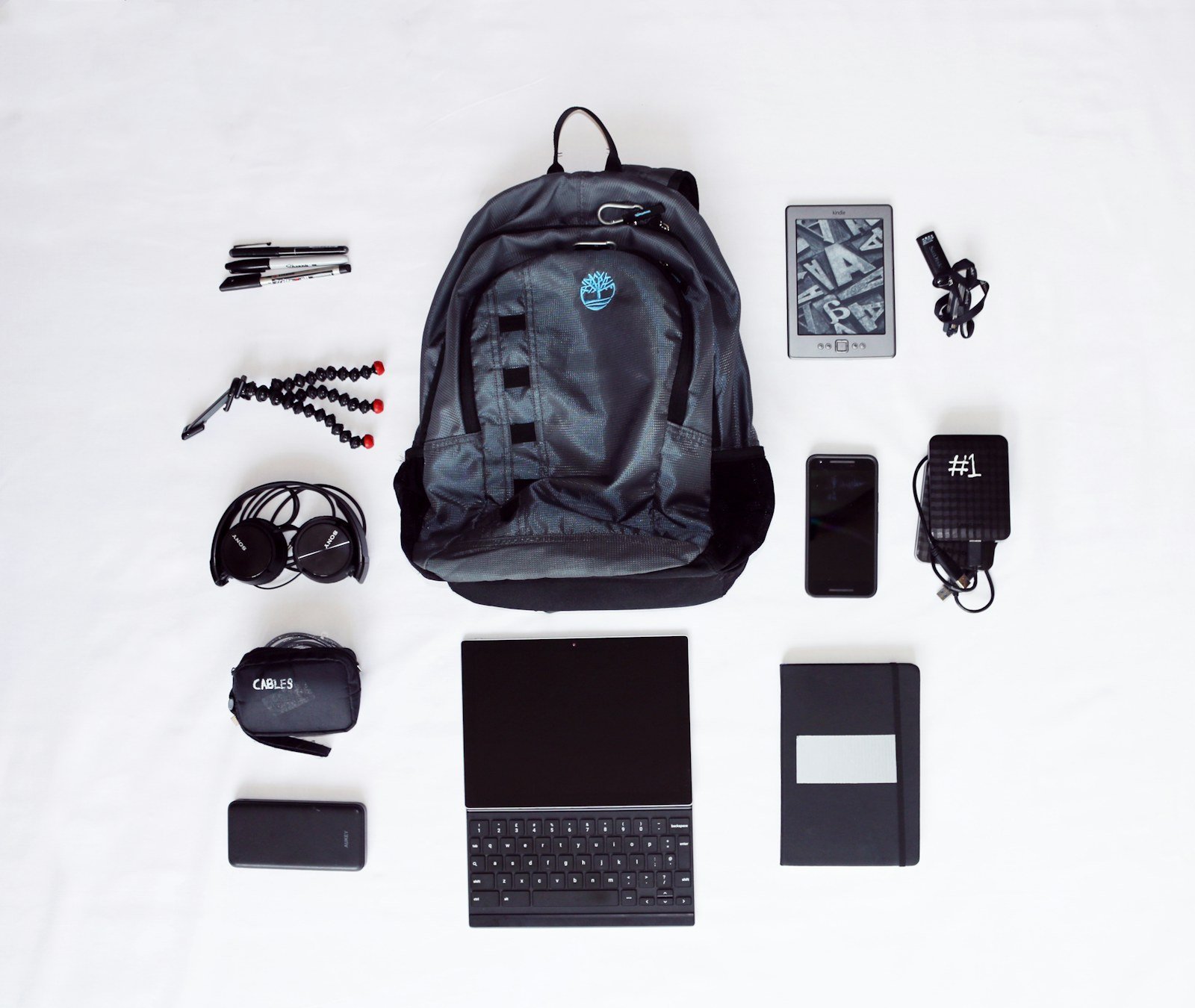
Sort items by where they belong
Packing becomes manageable when every item goes to daily carry, conditional carry, or leave at work. This replaces the vague question with a more useful one: What is the cost of not having this item today?
Daily carry
Keep items that are used on most workdays or that prevent a meaningful interruption when absent. Typical examples include access badge, keys, phone, wallet, work device, charging cable, glasses, and any required transit item.
Conditional carry
These items earn a place only when the calendar, commute, weather, or task makes them relevant. A presentation adapter, lunch container, umbrella, gym clothes, sample materials, or a larger charger may belong here. Packing them the evening before keeps the standard load stable while allowing for real exceptions.
Leave at work
Low-frequency items that are bulky, inexpensive to replace, or already supported by workplace facilities do not need to travel daily. Consider desk storage for spare stationery, a backup charger, reference documents, basic toiletries, or meeting supplies. Before carrying an item, check whether the office already provides it reliably.
A quick weekly reset helps: remove anything untouched all week, then note whether its absence would have caused more than minor inconvenience. If not, it is probably not daily carry.
Build a core that fits the day
A compact work bag starts with non-negotiables: items required to enter, perform, and leave work comfortably. Their exact mix changes by role, but the categories stay stable: access, work tools, personal essentials, and comfort.
An office-based day may need a badge, laptop, charger, notebook, and headphones. A mobile role may replace the notebook with a power bank, car or transit access, and a weather layer. Clinical and field settings can add approved identification, protective equipment, secure-device rules, or specialized tools; these requirements deserve priority over convenience items. Hot-desking often makes a small adapter, portable mouse, and privacy-aware headset more useful than desk-bound duplicates.
Check the limits before packing
Workplace policy can narrow the list substantially. Some sites restrict cameras, removable storage, personal chargers, fragrances, food, sharp tools, or unapproved software and devices. Secure environments may require issued equipment and prohibit personal laptops or recording-capable wearables. When an item is supplied at the destination—such as a dock, monitor, locker, first-aid provision, or protective gear—it generally belongs in the “stored at work” category rather than the bag.
Use one item for each job
The daily core works when every item has a distinct role. Carrying both a laptop charger and a power bank can help on long days.
A practical core often includes:
- Access: badge, keys, transit or parking credential, required ID.
- Work: primary device, one reliable power method, and the day’s essential input tool.
- Personal: phone, wallet, medication or personal-care items as needed.
- Comfort: water container, compact layer, headphones or ear protection where appropriate.
Before leaving, compare the core with the calendar. A client visit, site walk, presentation, or travel segment may justify one schedule-specific add-on. If no event creates a clear need, it stays out.
A lighter bag follows clear boundaries
Before packing, name the job of each item. If two objects answer the same need, carry the smaller or more reliable one—unless the day has a specific backup requirement.
Keep access tools within reach
A work bag is a poor home for anything needed at a doorway, time clock, secured unit, or workstation. Credentials, keys, access cards, and required badges belong on the body or in the same outer pocket every day—not beneath a laptop sleeve or lunch container. The goal is a repeatable retrieval point, not simply a place to carry them.
A lanyard, badge reel, key clip, or dedicated quick-access pocket can work, provided it suits site rules and does not interfere with the job. Keeping these items together also makes the end-of-shift check simple: badge, keys, phone, then bag.
Split permanent ID from today’s work tools
Shift-based roles often accumulate tools that look essential but are only needed for a particular assignment. Separate the everyday access set from documentation and workflow gear before leaving home.
- Always accessible: employee ID, access card, keys, parking pass, and any role-required identifier.
- Pack for today: clipboard, approved forms, unit-specific reference material, pens, charger, or device accessories.
- Leave at the workplace when permitted: spare forms, bulk stationery, reference binders, and equipment shared across shifts.
For clinical or field workflows, documentation gear benefits from its own slim pouch or clipboard rather than being mixed with personal items. That arrangement keeps the bag from becoming a mobile supply closet while making the day’s materials easy to audit. At handoff or between locations, a single document carrier is also less likely to be overlooked than loose papers distributed across several pockets.
Carry only the tech the day requires
A work bag needs a device plan, not a collection of electronics. Start with the employer-approved laptop or tablet, its required authentication method, and any device genuinely needed away from the desk. A personal second computer, spare peripherals, or a full docking setup usually add bulk without improving a normal office day.
Power needs change with the destination. For a fixed office with assigned desks, a compact privacy screen that fits the office laptop may be more relevant than carrying a large battery. For client sites, shared spaces, or transit-heavy days, carry the manufacturer-supplied charger and the one cable or adapter required by the confirmed display, outlet, or phone setup. Check connector types before leaving; a single USB-C cable can replace several items only when the device, charger, and accessory support the needed power or video standard.
Let the exposure determine security gear
Privacy and security accessories are useful when they address a defined risk, not because they seem universally prudent. A screen filter can reduce casual side viewing in open seating, while a cable lock may matter only where the employer permits it and the laptop has a compatible anchor point. Avoid unapproved USB drives, wireless dongles, storage media, and charging accessories: they can conflict with device-management or data-handling rules.
A lean technical carry often consists of:
- approved work device and access token
- matched charger and one verified cable
- destination-specific display adapter, if confirmed
- a privacy accessory only for exposed viewing conditions
Keep these items together in a small pouch so setup is quick and omissions are obvious.
Make ergonomics portable only when desks change
A laptop stand, compact keyboard, and mouse can earn space when work regularly moves between unassigned desks, meeting rooms, and home—especially for sessions long enough that a low screen and trackpad become the default setup. The value is not the gadget count; it is the ability to create a repeatable working position from an unfamiliar desk.
A slim folding stand is usually the highest-return addition because it raises the display without consuming much bag volume. Once a stand is used, an external keyboard and mouse become more relevant: typing on the laptop keyboard while the screen is elevated is awkward. For short email checks or a single meeting, however, the full trio often adds more packing than benefit.
Match the kit to the location
- Carry it daily when desk assignment changes often, laptop work dominates, and no reliable peripherals are provided.
- Leave it at a fixed workspace when a monitor, dock, keyboard, and mouse are already set up. Duplicating them in a bag rarely improves the day.
- Use a locker kit when the same office is visited regularly but the desk is shared. A labeled pouch protects personal peripherals from becoming desk clutter.
- Pack it for occasional travel when hotel or client-site work involves sustained laptop sessions. This keeps infrequent gear out of the everyday load.
Before adding anything, check desk depth, available ports, and whether a stand blocks the laptop camera or ventilation. A small cable and a cleaning cloth may matter more than a second input device at shared desks.
Decide whether peripherals earn their space
A personal mouse, compact keyboard, webcam, or headset is worth carrying only when it fixes a recurring limitation that the available workstation cannot. The test is not whether it is nicer than built-in equipment; it is whether the improvement survives the full routine of packing, connecting, storing, and cleaning.
Count the hidden costs
A peripheral can add more than its listed weight:
- Setup friction: pairing Bluetooth, finding a free port, installing approved software, or adjusting display and input settings can consume the first minutes of a meeting.
- Cable sprawl: dongles, charging leads, and long headset cords can snag in a bag or clutter a shared desk. A short cable, captive receiver, or dedicated pouch limits loose parts.
- Noise: clicky switches, loud mouse buttons, call leakage, and mechanical key noise can be disruptive in open offices.
- Upkeep: rechargeable gear needs a charging rhythm; batteries, adapters, and receivers are easy to misplace.
A compact, quiet mouse often earns its place for frequent spreadsheet or design work. A full keyboard is harder to justify unless its layout is needed for sustained typing and a reliable desk setup is available. For occasional calls, a work-issued headset kept on site may be simpler than carrying one daily.
Shared equipment also changes the calculation. Follow workplace procedures for cleaning keyboards, mice, headsets, and desk surfaces; use only approved products and methods, especially around openings, microphones, and screens. Personal gear should be packed away promptly after use rather than left to occupy a shared desk.
Pack for retrieval, then subtract what has not earned a place
-
Reset the bag at the end of each workday
Return every item to its assigned pocket before the next departure. A stable layout makes absence obvious: an access card, cable, notebook, or adapter is noticed before it becomes a morning search.
-
Load in order of retrieval
Place arrival items first, then tools used during the main work block, then departure items. Rare contingencies belong in the least accessible area—or outside the daily bag entirely.
-
Keep a one-week carry log
Use a small note with three marks: used, carried but unused, and wished-for. Record the context, not just the item; a charger left untouched may still be justified on long off-site days.
-
Run a weekly subtraction review
Remove items unused across ordinary days unless a specific upcoming event requires them. Replace repeated bundles with one multi-purpose item only when it remains reliable and easy to retrieve.
-
Create a leave-at-work list
Supplies, duplicate cables, reference materials, and ergonomic gear that are consistently needed at one site can move to a drawer, locker, or approved shared storage.
Let evidence, not anxiety, shape the bag
- A fixed layout reduces both forgotten essentials and time spent digging.
- An unused item is useful data, not a reason to defend clutter.
- Separate site-based supplies from mobile work tools.
A work bag stays useful when its contents reflect observed use, calendar demands, and workplace access—not vague possibilities. Retrieval order turns packing into a quick check rather than a daily rummage.
The weekly review keeps the system responsive: items can be removed, consolidated, or assigned a permanent workplace home as patterns become clear.
Work Bag Packing: Common Questions
What's the difference between daily carry and conditional carry?
Daily carry items are used on most workdays or prevent a meaningful interruption when absent, like an access badge, keys, phone, and charging cable. Conditional carry items, such as a presentation adapter or umbrella, earn a place only when the calendar, commute, weather, or task makes them relevant, and are packed the evening before.
How do I know if an item should stay at work instead of traveling in my bag?
Check whether the office already provides it reliably, such as a dock, monitor, locker, or first-aid provision. Low-frequency items that are bulky or inexpensive to replace, like spare stationery or reference binders, generally belong in desk storage rather than the daily bag.
Is it worth carrying a personal mouse or keyboard to work?
Only if it fixes a recurring limitation the available workstation can’t. The test isn’t whether it’s nicer than built-in equipment, but whether the improvement survives the full routine of packing, connecting, storing, and cleaning it every day.
How can I tell if an item has earned a permanent place in my work bag?
Use a frequency test: if an item hasn’t been used across several typical workweeks and no specific upcoming need exists, it’s probably storage, not daily carry. A one-week carry log noting used, carried but unused, and wished-for items can make this pattern clear.





10 Comments
I keep a spare charger in my bag because I got burned once when the office ones were all missing. Does that count as a “defined risk,” or is the idea that I should leave one at my desk instead?
That is a good example of a defined risk if you regularly move between rooms or worksites and cannot rely on a desk charger. If you have a consistent assigned desk, a desk charger is usually the lighter solution. The key is choosing one deliberate backup rather than accumulating several cables and power banks “just in case.”
The part about approved devices is useful. I sometimes bring my personal tablet “just in case,” then it never leaves the bag. I suppose that is exactly the kind of item the weekly subtraction check is meant to catch.
How do you handle paperwork that is only needed on certain days? I have client notes and forms on Tuesdays and Thursdays, but I don’t want to forget them when those days come around.
Treat that as a schedule-driven extra rather than part of your daily core. A labeled folder or slim pouch kept near your departure point can work well, paired with a calendar reminder or a recurring checklist on the relevant days. That keeps it separate from the access items you need every day.
I’m a little skeptical about leaving peripherals behind. The shared keyboards at my workplace are pretty gross, and cleaning procedures exist mostly on paper 🙃 A compact keyboard and mouse feel worth the space to me.
What counts as a reasonable core for someone whose schedule changes every day? Some days I’m at a desk, other days I’m in meetings across a large building, and occasionally I’m visiting a site with different badge rules.
I worry that a strict core will just make me underprepared. But carrying two badges, a notebook, cables, adapters, headphones, and a power bank every single day is getting old fast.
The “portable ergonomics only when desks change” advice makes sense, although I confess my laptop stand has become emotional-support office equipment.
I work from home three days and hot-desk two days. Would you keep the stand in a dedicated travel kit, or buy a second cheap one for the office locker?
I’d vote for the locker one if you have reliable locker access. I did that with a stand and a real mouse, and my commute bag immediately stopped feeling like I was transporting a tiny IT department.
The retrieval point is bigger than people realize. I used to carry a perfectly reasonable amount of stuff, but my badge was always buried under receipts, earbuds, and whatever else landed in the front pocket.
Now the badge stays on my lanyard and work keys go in the same small pocket every day. It feels almost comically simple, but I’m no longer doing the door-side bag excavation routine.