

A compact, well-chosen bag can make an unfamiliar office feel far less daunting.
The first hurdle may be a turnstile with an unrecognised badge reader, a desk without a charger, or a lunch break that arrives before anyone has explained the local routine. Preparedness is not packing for every possible mishap. It is carrying a few items that keep small unknowns from becoming distracting problems.
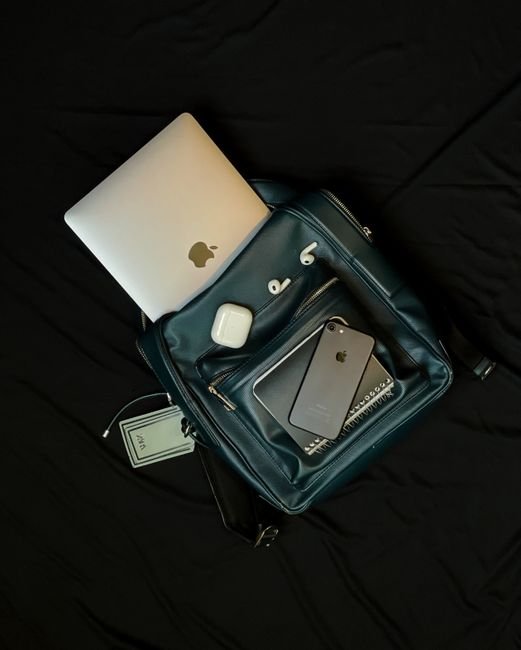
A clean, professional bag with photo identification, any onboarding email or contact details, a charged phone and charging cable, notebook and pen covers the essentials. A small water bottle and a modest snack can bridge an unpredictable first break; mints or tissues are unobtrusive additions. Clothing works similarly: choose a polished, comfortable layer that can adapt to an office running warmer or cooler than expected, rather than bringing a full change of outfit. If issued equipment has been requested, bring it; otherwise, avoid arriving with personal laptops, bulky peripherals, or sensitive documents unless the employer has explicitly asked. The aim is low-friction readiness: enough to settle in calmly, little enough to move easily when the day’s routines reveal themselves.
- Keep the hiring manager’s name, reception number, and office address available offline in case mobile reception or access fails.
- A silent phone, minimal bag clutter, and readily accessible ID make security check-in smoother.
Follow the employer’s instructions first
Generic first-day lists are useful only after checking the employer’s specific instructions first.
The offer letter, welcome email, onboarding portal, and calendar invitation often contain site-specific requirements that override broad advice.
A corporate office, warehouse, client site, laboratory, and remote orientation can require very different preparation.
Details worth confirming
Before packing, compare the latest written messages for:
- reporting time, time zone, building, floor, and named entrance;
- badge collection, visitor registration, photo ID, and security screening;
- parking, transit, bike storage, or shuttle instructions;
- dress or protective-equipment rules, device policy, and restricted items;
- documents, forms, laptop arrangements, and meal or break information.
Treat the calendar invitation as operational evidence: its location field may differ from an earlier email. When messages conflict, the most recent note from HR or the onboarding contact generally carries more weight. Additionally, a manager can clarify team-specific expectations. Keep the email and contact number offline in case reception or mobile service is limited.
Bring what has been explicitly requested, then only compact backups. A saved screenshot of directions and the host’s contact details can be more useful than extra supplies when an entrance or meeting room changes.
Keep check-in details secure
A small document pouch or one protected phone folder keeps check-in moving without exposing every personal record.
Additionally, before packing, check workplace security rules first. Some sites require government-issued photo identification, prohibit cameras, or collect devices at reception.
Bring the original only when the employer explicitly requests it for identity or work-eligibility verification, building access, or a credential issue. Keep it on the person until it is needed; avoid leaving passports, social-security cards, or similar high-value records in an unattended bag or car. If paperwork is to be completed on site, a pen and the relevant original may be more useful than a stack of copies.
A phone copy is usually enough for practical details: the recruiter’s message, office address, host name, parking or transit instructions, meeting time, and a confirmation number. Save these for offline viewing and keep the phone locked. A screenshot can be faster to retrieve than searching an inbox at a reception desk.
For less certain items, use quick retrieval instead of carrying them. Store a scan in an encrypted cloud account or password-protected device, with account access available. Additionally, this limits the consequences of a lost bag while keeping a requested record reachable.
Avoid sending sensitive scans through unprotected email or messaging simply for convenience.
Pack technology only after the setup is confirmed
A personal laptop is not automatically useful on day one. Some organizations issue a configured computer, phone, security key, headset, and charger at orientation. Bringing duplicate equipment can add clutter and raise questions about unapproved devices.
In a fully equipped setup, the practical technology kit may be limited to a personal phone and its cable. Any accessibility item should already be cleared with the employer.
Match the bag to the operating model
In a bring-your-own-device (BYOD) setup, only take equipment explicitly confirmed as acceptable. Ask whether the device must meet an operating-system version, encryption, antivirus, mobile-device-management, or port requirements before relying on it. A laptop without the required USB-C, HDMI, or Ethernet adapter can be less useful than a small, compatible adapter already approved for the workplace.
A hybrid setup commonly means a company computer for protected work and a personal phone for scheduling, multi-factor authentication, or travel updates. Keep those roles separate. Do not assume personal cloud storage, a personal USB drive, or a consumer note-taking app is permitted for company material—even temporarily.
Before packing, confirm these points in the welcome message or with the named contact:
- Which device is issued, and when it will be available
- Whether a personal laptop, tablet, or phone is allowed on site
- Required charger type, adapters, headset, or security token
- Whether guest Wi-Fi is available and what connection method is approved
- Any restrictions on cameras, recording, removable media, or external drives
Bring only confirmed essentials. Device serial numbers, screenshots of internal systems, passwords, and client information do not belong in a personal bag or personal account.
Carry small comforts and a way to take notes
Orientation often involves unfamiliar rooms, variable temperatures, long introductions, and breaks that move without warning. A light, low-profile comfort kit can keep minor distractions from taking over: a refillable water bottle if permitted, tissues, mints, and a small snack where workplace rules allow it. Avoid packing a full collection of personal supplies; the aim is to remain comfortable, not to recreate a desk drawer in a bag.
A notebook and a pen are particularly useful even when laptops are available on the job. Names, team acronyms, building procedures, system names, and promised follow-ups arrive quickly on a first day.
Handwritten notes also avoid the appearance of being distracted by a phone during introductions.
Capture information that needs action
Additionally, a simple page structure keeps notes usable after orientation:
- People: name, role, pronunciation, and how their work connects to the new role.
- Terms: acronyms, tools, internal channels, and processes to look up later.
- Actions: documents to submit, training to complete, access requests, and stated deadlines.
- Questions: items that could not be clarified in the moment.
A compact notebook is easier to retrieve than loose paper and less conspicuous than opening a large bag repeatedly. At day’s end, transferring action items to an approved work system can prevent important details. This ensures nothing slips away in first-day notes.
Choose a bag for the actual day
A first-day bag is a transport system, not an accessory. Its size should follow the confirmed load. Include a work device if approved, a charger, identification or requested documents, a notebook, water, and any commute-specific layer. This keeps the bag manageable and speeds security checks.
However, packing for every possible scenario often makes a heavy, disorganized bag that is awkward at security desks and introductions. The goal is to tailor the load to daily needs and minimize bulk. Organizing essential items reduces effort at checkpoints and helps introductions go smoothly.
Compare formats by the route
- Backpack: usually suits walking, cycling, public transit, or a longer commute. A padded laptop sleeve, stable shoulder straps, and a separate quick-access pocket help protect equipment and keep arrival items reachable without unpacking everything.
- Tote or shoulder bag: can work for a light load and short trip, especially when a laptop is not being carried. Look for a zip closure and internal structure; open bags make cards, keys, and paperwork easier to expose or lose in crowded spaces.
- Briefcase or slim messenger: often fits a document-heavy, laptop-based arrival with limited extra gear. It gives orderly access at reception, but can become uncomfortable if a water bottle, lunch, or bulky layer is added.
- Rolling bag: may be practical for substantial equipment or a long rail journey, provided the workplace route includes lifts and adequate storage. It can be inconvenient on stairs, turnstiles, and tight orientation rooms.
Keep the first five minutes separate
Place the items needed at arrival in one secure outer or top compartment. Items include a phone, photo ID or access instructions. Also include a transit card, glasses, and a small charging cable. Keep the most used items in the outer section for quick access. This reduces rummaging during arrivals.
Sensitive documents and electronics belong deeper inside, ideally in padded or zippered sections. Before leaving, check whether the desk, locker, or hot-desk area can store the bag. Additionally, a compact bag is easier to place safely during meetings and training.


More Gear Can Create More Problems
Only items needed for the confirmed schedule tend to help.
Unrequested notebooks, chargers, stationery, or snacks can be awkward in a shared workspace and may duplicate supplies already provided.
External storage may be restricted or blocked by company security controls.
Even an empty drive can trigger concern because it can transfer data or malware. Bring one only when the employer explicitly permits it.
Clean, workplace-appropriate clothing and a light scent—or none—are lower-risk choices.
Strong fragrance can distract colleagues or affect scent-sensitive spaces; conspicuous accessories can feel mismatched before local norms are known.
Only essential valuables belong in the first-day bag.
Orientation can involve tours, shared rooms, temporary desks, and uneven access to secure storage. Leave irreplaceable items and any prohibited or sensitive materials elsewhere.
Set up a calm departure routine
-
Re-read the latest employer message
Check the most recent email or portal update for the reporting time, entrance, host name, dress notes, identification request, and device instructions. A late update overrides an older calendar invitation or informal message.
-
Charge and stage essential technology
Fully charge the phone and any explicitly requested device. Download the route, save the address and contact number offline, and place a compatible charging cable or power bank in the bag only if it is permitted and useful.
-
Put arrival items where a hand can reach them
Keep the access email, photo ID if requested, transit pass, keys, and glasses or hearing aids in an outer pocket or small pouch. This prevents a bag search at reception.
-
Reduce morning decisions
Lay out clothes, outer layer, shoes, bag, and food or water permitted by the workplace. Check the commute with a realistic arrival buffer, including building entry and elevator time.
-
Use a short door-check
Before leaving, confirm phone, keys, wallet or transit method, ID if requested, bag, and directions. Then send no further messages unless a genuine change affects arrival.
Map apps can fail in stations, garages, or unfamiliar business parks. A screenshot of the final walking route, building entrance, and reception floor can be more useful than the full itinerary.
If transit is involved, noting one alternate stop or service helps contain a delay without turning the morning into a research task.
First-Day Bag: Common Questions
Should I bring my own laptop on the first day?
Not automatically. Many employers issue a configured computer, phone, security key, and charger at orientation, so bringing a personal laptop can add clutter and raise questions about unapproved devices. In a bring-your-own-device (BYOD) setup, only take equipment the employer has explicitly confirmed as acceptable.
Do I need to carry the original of my ID or work documents?
Only when the employer has explicitly asked for the original, such as for identity or work-eligibility verification, building access, or a credential issue. For most other details, like the recruiter’s message, office address, host name, and confirmation number, a saved phone screenshot is usually enough.
What kind of bag works best for a first day?
The right format depends on the confirmed commute and load. A backpack suits walking, cycling, or transit with a laptop; a tote or shoulder bag works for a light load without a laptop; a briefcase or slim messenger suits a document-heavy, laptop-based day with limited extra gear; and a rolling bag can help with substantial equipment on a route with lifts and storage.
Is it a good idea to bring a personal USB drive as a backup?
No, not unless the employer has explicitly permitted it. External storage devices may be restricted by company security controls, and even an empty drive can raise concern because it could be used to transfer data or malware.
What should be left at home on the first day?
Anything not confirmed as needed: duplicate personal tech if a device has already been issued, irreplaceable valuables, sensitive documents beyond what’s requested, and a fully packed “just in case” kit. A lighter bag reduces the chances of loss, distraction, or security questions at check-in.
Arrive Ready, Not Overloaded
The first-day bag has done its job if it lets a new hire check in, learn names and processes, communicate when plans change, and remain reasonably comfortable through the commute and orientation. That usually means confirmed instructions, protected essentials, a charged approved device where needed, notes, water, and an adaptable layer—not a portable office.
Privacy and a manageable weight deserve more attention than contingency supplies. As routines settle, a broader guide to what to carry to work can help refine a daily kit around the actual commute, role, and workplace rules.




8 Comments
The advice about only carrying original documents when requested would have saved me some anxiety. I used to bring every ID, certificate, and banking paper I owned on day one because I thought being overprepared was professional.
Mostly it just meant I spent the commute worrying about losing a folder full of sensitive stuff. A photo/secure copy or encrypted access to the relevant item makes much more sense when the employer hasn’t asked for originals.
Thank you for mentioning strong fragrance. People act like it’s a tiny issue, but a packed orientation room can be brutal for anyone with migraines or allergies. Clean clothes and deodorant are plenty; no need to announce yourself from the elevator.
I’m not convinced handwritten notes are always practical. At my last onboarding we were given links and a pile of digital docs, so I just used a notes app. Is the point mainly having a backup if Wi-Fi/account access isn’t ready yet?
That was my experience too. A small notebook helped because I could write down names and quick instructions before they had finished setting up my account. I transferred the useful bits later.
What counts as an “adaptable layer” if the office dress code is still a little vague? I was thinking a plain cardigan, but I don’t want to be the only person dressed too casually. The recruiter only said business casual, which somehow means 10 different things depending on the company.
I start a hybrid role next month and they said a laptop will be provided “on arrival.” Would you still bring my personal laptop just in case, or is that exactly the kind of extra gear to avoid? I’m worried about sitting around unable to do anything, but also don’t want to look like I ignored instructions.
If they have said a laptop will be provided, I would normally leave the personal one at home unless your contact specifically asks you to bring it. Many workplaces have device-registration and data-security rules, and the first day is usually accounts, orientation, and setup anyway. Bring your phone, charger if appropriate, and the contact details for the person expecting you; if setup changes, they can tell you what is needed.
The offline route point is underrated. My phone died outside a new office once, and of course the building entrance was tucked behind another building 🙃 Now I screenshot the map, lobby instructions, and my contact’s number before leaving.