NIMO 15.6″ IPS FHD Review — Intel i3-1215U, 16GB/512GB Laptop for Creators, Students & Home Business
Introduction
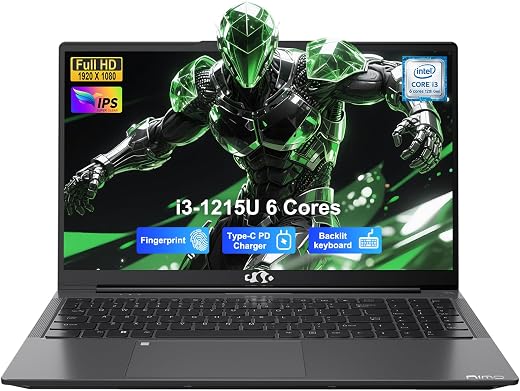
The NIMO N154 is a 15.6″ Windows laptop positioned at the budget to midrange segment for students, creators doing light content work, and small home businesses. Manufactured by NIMO Direct Inc, it pairs a 12th‑Gen Intel Core i3‑1215U processor with 16GB of DDR4 memory and a fast NVMe SSD. The configuration reviewed here (marketed in some places as 512GB) aims to balance everyday performance, portability and a full set of modern connectivity features at an aggressive price.
Brief Overview
– Manufacturer: NIMO (NIMO Direct Inc)
– Product category: Ultra‑portable 15.6″ Windows laptop / student & small business laptop
– Intended use: web browsing, document work, video calls, light photo/video editing, streaming, schoolwork, and general home business tasks
Appearance, Materials & Design
The NIMO N154 has a clean, utilitarian aesthetic in a neutral gray finish. The chassis appears to be primarily plastic with a soft matte texture rather than premium metal; this keeps weight down and helps hide fingerprints. The lid and palm rest are simple and unadorned, which fits its student/business focus rather than luxury styling.
Notable design elements:
- 180° lay‑flat hinge — handy for collaboration and presentations.
- Backlit island keyboard with numeric keypad — useful for late night work and data entry.
- Physical webcam privacy shutter and integrated fingerprint reader — convenient privacy and security touches.
- Relatively slim profile (about 0.76″ / 19.2 mm thickness) and lightweight for a 15.6″ laptop (specs list ~3.8 lb / ~1.7 kg).
Key Features & Specifications
Below are the primary specs for the reviewed NIMO N154 configuration. Note: product listings sometimes vary — some marketing text references 1TB storage while this review is focused on the 512GB SSD SKU commonly listed alongside the 16GB RAM option.
- Processor: Intel Core i3‑1215U (12th Gen, 6 cores, up to 4.4 GHz)
- Memory: 16GB DDR4 (3200 MHz) — dual slots, upgradable up to 64GB
- Storage: 512GB NVMe SSD (some listings reference 1TB — verify the SKU before purchase)
- Display: 15.6″ FHD (1920×1080) IPS, anti‑glare, 180° hinge
- Graphics: Integrated graphics (shared memory) — entry‑level GPU capability
- Battery: ~53.6 Wh / 54Wh Li‑Polymer; vendor claims up to ~7.5–9 hours (real world will vary)
- Charging: 65W Type‑C PD fast charger included
- Connectivity: Wi‑Fi 6, Bluetooth 5.2
- Ports: Full function USB‑C (PD + DP + data), HDMI, multiple USB Type‑A ports (advertised up to 5 total USB ports), media card slot, headphone jack
- Extras: Backlit keyboard, numeric keypad, fingerprint reader, webcam with physical privacy shutter
- OS & Warranty: Windows 11 Home; 2‑year warranty (manufacturer), 90‑day return window
- Weight & Dimensions: ~3.8 lb (1.7 kg), 14.07″ × 8.98″ × 0.76″
Real‑World Usage & Performance
Everyday productivity (students & office work)
For web browsing, document editing, spreadsheets, note taking and online learning, the i3‑1215U combined with 16GB of RAM feels snappy. You can comfortably run multiple browser tabs, Microsoft Office/Google Workspace apps, Zoom/Teams and a few background utilities without notable slowdowns. The backlit full size keyboard (including numeric keypad) is comfortable for extended typing sessions and the fingerprint reader speeds up logins.
Video calls & conferencing (home business)
The webcam includes a physical privacy shutter and the integrated microphone and speakers suffice for typical video calls. Expect clear voice capability for meetings, though speaker volume and fidelity are typical for an inexpensive laptop — adequate for one person but thin for group listening. Wi‑Fi 6 helps stabilize higher quality video calls on congested networks.
Light content creation (creators & students working on media)
The CPU is capable for light photo editing and short 1080p video edits in applications like Photoshop, Affinity, or DaVinci Resolve at lower timelines. However, the integrated GPU and modest thermal headroom mean heavy 4K editing, complex effects, or long render jobs will be slow compared with laptops that have stronger CPUs or discrete GPUs. The IPS FHD panel gives accurate colors for casual edits, but serious color work may benefit from an external calibrated display.
Media & streaming
The 15.6″ IPS FHD screen provides a pleasant viewing experience for streaming and media. Anti‑glare treatment reduces reflections in bright rooms. Battery life during streaming will be shorter than simple productivity use — expect real world results around 5–8 hours depending on brightness and workload.
Portability & battery life
With a slim 0.76″ profile and weight around 3.8 lb, the N154 is reasonably portable for a 15.6″ machine. The included 65W USB‑C PD charger is convenient and multi device friendly. Battery life claims vary (manufacturer cites up to 7.5 hours; specifications list ~9 hours). In mixed real‑world usage I would budget for 6–8 hours for mixed tasks; heavier workloads and high brightness reduce that significantly.
Thermals & noise
NIMO advertises a dual fan cooling system. Under light tasks the laptop stays quiet; under sustained CPU load you may hear fan activity. Expect some thermal throttling under long, heavy workloads (large exports, prolonged video encoding) as is common in this power/price class. The chassis design helps keep surfaces reasonably cool during normal use.
Pros
- Good value: 12th‑Gen i3 + 16GB RAM at a competitive price point.
- Comfortable 15.6″ IPS FHD anti‑glare display with 180° hinge for sharing.
- Backlit keyboard with numeric keypad — excellent for students and data entry.
- Fingerprint reader and webcam shutter add convenience and privacy.
- Modern connectivity: Wi‑Fi 6, Bluetooth 5.2, full function USB‑C (PD + DP), HDMI and multiple USB ports.
- Upgradable memory (two slots, up to 64GB) and NVMe storage options.
- Lightweight and slim for a 15.6″ laptop; 65W PD fast charging included.
- Two year warranty — better than many competitors at this price point.
Cons & Limitations
- Build materials are mostly plastic — durable but not premium metal. Feels budget oriented.
- Integrated graphics limit performance for serious gaming or heavy GPU accelerated creative work.
- Marketing inconsistencies — some descriptions reference 1TB storage or mention different GPU branding; verify exact SKU/specs before purchase.
- Speakers are adequate but lack bass and richness for immersive media without headphones or external speakers.
- Battery life is average in real world use; heavy workloads cut into runtime noticeably.
- Fans can become audible under sustained load as the machine manages thermals.
Practical Recommendations
- Students: Excellent choice for note taking, remote learning, research and moderate multitasking. Nice keyboard and privacy features make it classroom friendly.
- Creators: Good as an entry or travel machine for light photo edits and 1080p video work — but don’t expect desktop class export times or 4K editing performance.
- Home business: A sensible pick for web conferencing, spreadsheets, invoicing, and multitasking. Plenty of ports to connect an external monitor and peripherals.
- Buyers should confirm the exact storage capacity on the listing (512GB vs 1TB) and check return/warranty terms if you rely on a specific configuration.
Conclusion
The NIMO N154 offers a compelling value proposition: a modern 12th‑Gen Intel i3 CPU, 16GB RAM, an IPS FHD 15.6″ screen, and a generous complement of ports and security features — all at a budget friendly price. It is well suited to students, everyday creators who do light editing, and small home businesses that need a reliable, portable machine with comfortable typing and good connectivity.
That said, it is not a performance powerhouse for heavy video production or gaming, and the chassis materials and speakers reflect its price tier. Also be attentive to slight inconsistencies in listings (storage size and occasional marketing wording around graphics). If you want a roomy 15.6″ laptop that emphasizes practicality, portability and modern connectivity for common productivity tasks, the NIMO N154 is a strong candidate and offers particularly attractive value given the included 16GB RAM and 65W PD charger.
Final score (subjective summary): A well rounded budget 15.6″ laptop — 4/5 for value minded students and small business users.

NIMO 15.6" IPS FHD Laptop (N154): Common Questions
Is the storage 512GB or 1TB?
This review covers the 512GB NVMe SSD SKU, which is commonly listed alongside the 16GB RAM configuration. Some marketing text references 1TB storage, so it’s worth verifying the exact SKU and listing before purchase if capacity matters to you.
Can this laptop handle video editing?
It handles light 1080p video editing in apps like Photoshop, Affinity, or DaVinci Resolve at lower timelines reasonably well, thanks to the i3-1215U and 16GB of RAM. But the integrated GPU and modest thermal headroom mean heavy 4K editing, complex effects, or long render jobs will be slow compared with laptops that have discrete GPUs.
How long does the battery actually last?
The manufacturer cites up to about 7.5-9 hours, but in mixed real-world use (browsing, video calls, document work) expect roughly 6-8 hours, dropping to around 5-8 hours during video streaming depending on brightness and workload.
Does it get loud or hot under load?
NIMO advertises a dual-fan cooling system that stays quiet under light tasks. Under sustained CPU load, such as large exports or prolonged video encoding, fan noise becomes audible and some thermal throttling is expected, which is common for this power and price class.
Is the build quality premium?
No. The chassis is primarily plastic with a soft matte texture rather than metal, which keeps weight down and hides fingerprints but feels budget-oriented rather than premium. The laptop is still reasonably portable at about 3.8 lb and 0.76″ thick.