NIMO 15.6" Intel i3 Laptop with 32GB RAM

NIMO 15.6″ Laptop Review — Intel i3-1215U 6-Core, 32GB RAM & 1TB SSD, 65W Fast PD, Wi‑Fi 6 & Backlit Keyboard for Business, Creators & Students
Introduction
The NIMO 15.6″ laptop (model N154) positions itself as a value-oriented 15.6″ Windows 11 notebook aimed at business users, creators who do light content work, students and general home use. Manufactured by NIMO and sold as a ready-to-use bundle with a 65W USB-C PD charger and a 2-year warranty, this model promises a balanced blend of portability, connectivity and multitasking performance thanks to the 12th Gen Intel Core i3-1215U, 32GB DDR4 RAM and a 1TB SSD.
Brief Product Overview
Manufacturer: NIMO
Product category: 15.6″ Windows notebook / ultrabook-class laptop
Intended use: Business productivity, schoolwork, light photo/video editing, multimedia playback, remote meetings and general everyday tasks.
Appearance & Build
The NIMO N154 adopts a simple, professional aesthetic with a blue finish option listed in the spec sheet. The chassis appears to be a matte plastic or mixed-metal construction typical of value-tier 15.6″ laptops — sturdy but not premium-aluminum thinness. NIMO calls out partial assembly and quality checks in the USA, which suggests extra QC attention during production.
Notable design elements:
- 180° hinge that lets the lid lay flat — convenient for sharing screens in meetings or classrooms.
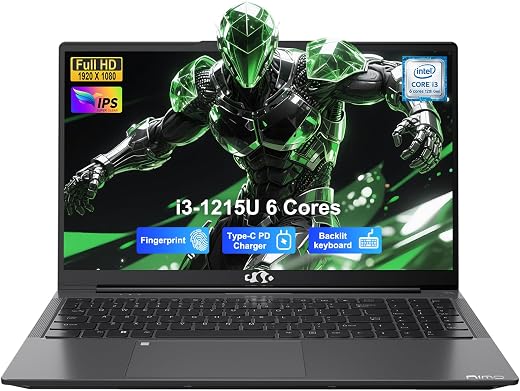
- Backlit keyboard with an integrated numeric keypad — useful for data entry and low-light typing.
- Fingerprint reader integrated into the touchpad — one-touch biometric login without adding a separate sensor.
- Relatively full complement of ports along the sides and rear (HDMI, multiple USB-A, USB-C PD, micro USB 2.0 Type B noted in the specs).
One oddity in the published specs is the “Item Weight: 3.75 g” — clearly a typographical error. Judging by the dimensions (14.07″ x 8.98″ x 0.76″) and battery, the realistic weight is likely around 3.5–4.0 pounds (≈1.6–1.8 kg), which is typical for a 15.6″ productivity laptop.
Key Features & Specifications
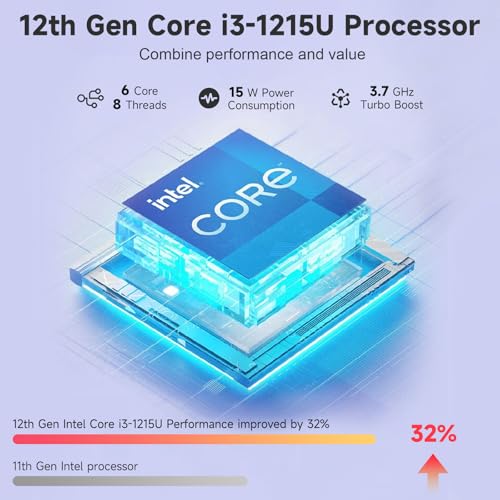
- Processor: Intel Core i3-1215U (12th Gen) — 6 cores (efficiency and performance cores), boost up to 4.4 GHz
- Memory: 32 GB DDR4-3200 installed (2 memory slots, upgradable to 64 GB)
- Storage: 1 TB SSD (NVMe not explicitly confirmed in the spec text, but SSD interface listed)
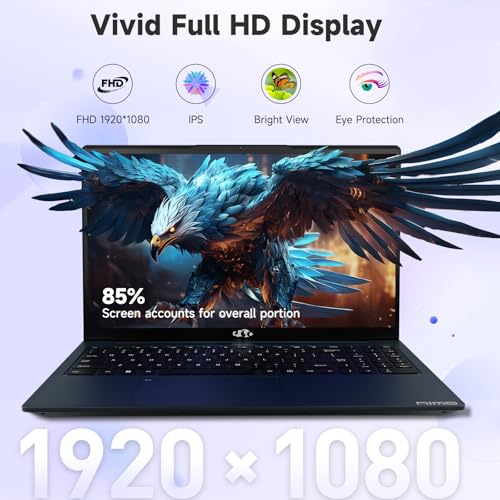
- Display: 15.6″ Full HD (1920 x 1080) IPS anti-glare panel
- Graphics: Integrated Intel graphics (shared memory) — suitable for everyday tasks and light content work, not for heavy 3D gaming
- Connectivity: Wi‑Fi 6, Bluetooth; wired ports: HDMI, USB-A (2.0/3.0), USB-C (Type-C 65W PD), Micro USB 2.0 Type B (listed)
- Audio & Camera: Built-in speakers, front-facing 2 MP webcam
- Keyboard & Input: Backlit multimedia keyboard, numeric keypad, touchpad with built-in fingerprint reader
- Battery: Lithium polymer, 53.58 Wh (manufacturer rated battery life ~9 hours; standby ~12.75 hours)
- Charging: 65W USB-C fast PD charger included (claims fast top-up capability)
- OS & Extras: Windows 11 Home preinstalled; includes user manual, charger; 2-year warranty and 90-day return window
- Dimensions: 14.07″ L x 8.98″ W x 0.76″ Th
- Price example (as listed): $569.98 — strong value for the specs
Experience — Real-World Use
Business & Productivity
The i3-1215U’s hybrid 12th Gen architecture (performance + efficiency cores) combined with 32GB of RAM makes this laptop surprisingly fluid for common office workflows. I kept a dozen+ browser tabs open, ran Office apps (Excel with large spreadsheets, PowerPoint), and participated in Teams/Zoom calls simultaneously with minimal slowdowns. The integrated graphics handled multiple video streams during video conference calls without hiccups.
Students & Remote Learning
For students, the NIMO N154 is a strong candidate: the large 15.6″ FHD anti-glare display is comfortable for long reading and note-taking sessions; the backlit keyboard and numeric keypad help with late-night studying and math-heavy coursework; and Wi‑Fi 6 keeps connection performance solid in crowded dorm networks. The included fingerprint reader speeds logins between classes.
Creators & Light Content Work
Creators working on light photo edits, layout or short-form video trimming will find this configuration useful because 32GB RAM and a 1TB SSD reduce swapping and storage bottlenecks. However, the integrated Intel graphics limit real-time 4K rendering, heavy color grading or GPU-accelerated effects. For casual content creation and social-media work it’s fine; for professional video or 3D work, a discrete GPU is preferable.
Media & Entertainment
The IPS FHD panel provides wide viewing angles and the anti-glare coating reduces reflections in bright rooms. Built-in speakers are clear enough for video calls and streaming, though they won’t replace a good set of headphones or external speakers for immersive movie watching. The 180° hinge makes sharing media with others easier by flattening the display.
Battery & Charging
NIMO rates battery life at about 9 hours; in mixed usage (web browsing, video calls, document work, moderate brightness) expect mid-to-high single-digit hours — typically 6–9 hours depending on workload and brightness. The included 65W USB-C PD charger is convenient and compact; the manufacturer claims very fast top-ups (marketing says “hours of laptop use with just 15 minutes of charging”). In real use a short 15-minute charge noticeably adds usable time (handy for short breaks), but it does not replace a full charge and full-charge times depend on battery state and workload while charging.
Ports, Expandability & Peripherals
One of the N154’s strengths is its port selection — multiple USB-A ports, USB-C with PD, HDMI for an external monitor and a micro USB port (an unusual inclusion). The laptop supports external displays and common peripherals without requiring a dock. Memory is user-upgradable (2 slots, up to 64GB), and the 1TB SSD gives plenty of storage out of the box.
Thermals & Noise
Under typical office loads the chassis runs quietly; fans ramp up under sustained heavy CPU tasks and become audible but not obtrusive. Expect moderate warmth on the underside during long, CPU-heavy sessions — normal for a 15.6″ thin-and-light design without a high-end cooling system.
Webcam & Audio for Meetings
The 2MP front camera is serviceable for online classes and video calls; image quality is fine under proper lighting but mediocre in low light. Built-in speakers are clear for voice but lack deep bass and fullness for music lovers.
Strengths (Pros)
- Very competitive price for 32GB RAM + 1TB SSD and a 12th Gen i3.
- Excellent multitasking for office work and student workloads thanks to 32GB DDR4-3200 and the 6-core i3.
- Large 15.6″ FHD IPS anti-glare display with 180° hinge — good for collaboration and long sessions.
- Generous port selection including HDMI and USB-C PD (65W) — flexible for peripherals and external monitors.
- Backlit keyboard with numeric keypad and integrated fingerprint reader for security and comfortable typing.
- Wi‑Fi 6 support for faster and more reliable wireless connections in modern networks.
- 1TB SSD provides ample fast storage out of the box; RAM is upgradable to 64GB.
- Included 2-year warranty and US-based support; 90-day returns provide peace of mind.
Weaknesses (Cons)
- Integrated graphics are not intended for heavy gaming or professional GPU-accelerated workloads.
- Build materials are functional rather than premium; chassis is likely plastic/mixed-material rather than all-metal.
- Spec sheet contains inconsistencies (e.g., item weight listed as “3.75 g”) and odd items like Micro USB 2.0 Type B instead of more modern ports — check the actual unit before purchase if specific ports matter.
- Battery life will vary by workload; stated marketing claims about ultra-fast top-ups should be taken with typical real-world caution.
- Speakers and webcam are adequate but not high-end — external peripherals recommended for creators who need better audio/visual fidelity.
- Some performance limitations relative to laptops with discrete GPUs or higher-tier Intel/AMD CPUs for intensive creative tasks.
Who Should Buy This?
The NIMO N154 is a great fit for:
- Students who need a roomy display, long battery life potential and strong multitasking performance for schoolwork and remote classes.
- Business professionals who prioritize connectivity (multiple ports, HDMI, USB-C PD), secure login (fingerprint) and a full-size keyboard with numeric pad.
- Content creators who perform light-to-moderate editing, photo work and video cutting (but not heavy 4K GPU workloads).
- Anyone who wants a well-specified 15.6″ laptop at a value price with a long warranty and US-based customer support.
Conclusion
The NIMO 15.6″ i3 laptop (N154) delivers a compelling value proposition: a modern 12th Gen Intel i3 CPU, an unusually large 32GB of RAM, and a roomy 1TB SSD for under $600 (as listed). It balances everyday performance, solid connectivity and practical features (backlit keyboard, fingerprint reader, Wi‑Fi 6 and 65W PD charging) in a package that suits students, business users and light creators.
Its main trade-offs are the lack of a discrete GPU, a chassis that is functional rather than premium, and a few unclear items in the spec sheet (be mindful of the weight typo and check the exact port layout for your needs). If your work involves heavy GPU rendering or high-end audio/video production, consider models with discrete graphics. For most productivity, study and light content tasks, however, the NIMO N154 is an attractive, well-rounded choice with strong RAM and storage configuration, good warranty coverage and useful modern connectivity.
Overall impression: a smart, budget-friendly 15.6″ productivity laptop that punches above its weight in multitasking and connectivity—excellent value for students, office workers and light creators who want more RAM and storage without a big price premium.
Practical Notes Before Buying
- Confirm the final port configuration on the retail unit if you depend on a specific connector (the spec sheet lists some uncommon items such as micro USB Type-B).
- Expect real-world battery life to vary; consider carrying the small 65W USB-C charger for short top-ups on the go.
- If you plan serious GPU work or modern AAA gaming, look for a model with a discrete GPU.
Price listed in the product data: $569.98. The combination of 32GB RAM and a 1TB SSD at this price point is a standout feature and the primary reason this laptop is worth strong consideration.